mail usprint this pagerss feed

Liip is hiring!

Upload Progress Meter - Common issues and some answers

After I released uploadprogress 1.0.0 some days ago and finally declared it as stable, it's time to write that blogpost about some of the limitations and caveats one has to know.

Demo

A great help for testing if the extension works, are the demo files. Put them into a directory on your server and see, what it says. I tried to make the error messages as clear as possible. You can also check it out here: http://labs.liip.ch/uploadprogresssimple/

Call to undefined function uploadprogress_get_info()

If you get the above message, the extension wasn't properly installed. Make sure, you restart your webserver after you installed the extension and that it shows up in phpinfo() and there's an entry like this:
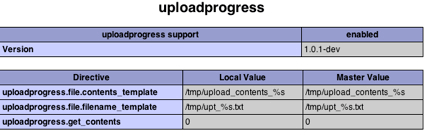
Uploadprogress

Also check, if the uploadprogress.so really ended up in your "extension_dir" (check that path in phpinfo()) or if you're using windows php_uploadprogress.dll

Running it on other modules than mod_php on Apache ( like fastcgi)

Unfortunately I only could get the extension running with mod_php on an Apache httpd. I tried with fastcgi, but somehow the hooks didn't get called and I wasn't able to investigate further. There's this bug for that issue, if you have anything useful to add, there's the place :)

Running on a Windows Server

With the 1.0.0 release from this week, the extension should now also run on Windows. At least, I had feedback that it does (with Apache and XAMPP). Get the DLLs from Pierre's download page.

Problems with Suhosin

The suhosin extension had a bug which prevented the uploadprogress from working properly. This bug was fixed in Suhosin 0.9.26 last August.

Temporary files

Please make sure that the path configured in uploadprogress.file.filename_template is set to something, which is writeable for the webserver. I tried to autodetect your temporary folder more accurately than just assume it's /tmp/ if not properly set. But at the end it was more complicated than I thought and not worth the trouble, as it has only to be set once.

Running on something < PHP 5.2

This is not possible, since the extension relies on some hooks/callbacks only introduced with PHP 5.2.0

Checking if files are too big

I often get asked if it's possible to abort the upload, if a file is too large. Here's the hopefully not too long answer:

There are 2 php.ini settings responsible for deciding what's "too large".

upload_max_filesize defines the max allowed size of one file. If you have more than one file upload field, each file can have this max size. It is by default 2MB.

post_max_size defines the size the whole post is allowed to take, including all your text-fields and all your file fields. This is 8MB by default and should be larger than upload_max_filesize to make sense.

Now, depending on what limit the post hits, different things happen. If the total post size is larger than post_max_size, then PHP aborts the upload just right at the beginning and never informs the extension about that. The whole upload happens nevertheless, there's just no data available to PHP at the end. We can't change that in the extension, there's never any data coming to the extension. Your only way to handle this is to check on the client side, if no data is getting through to the extension after some time and then inform the user about the fact, that his file may be too large.

On the other hand, if the whole post is smaller than post_max_size but a file is larger than upload_max_filesize you have a chance. The data is getting through to the extension and you can get the current info with uploadprogress_get_info(), for example the size of the file. If that size is larger than upload_max_filesize, you can inform your user, that it's too large and his upload is futile. The example handles that case with a message. With some client side trickery (eg. reload the upload iframe) you could even abort the upload.

The position and content of UPLOAD_IDENTIFIER within the form is important

The UPLOAD_IDENTIFIER field in your upload form is very important. Without this field, it won't work properly. Furthermore, the field has to be before the file upload fields in the form. The way it works on the server side is asking for that order.

And make sure the UPLOAD_IDENTIFIER value is unique to the form and is not used anywhere else. If you use it twice for different (simultanous) uploads, the values will be wrong. It's also better to not use the session-id for this, since if a user uploads two different files in two different forms, the result will be undefined. Something like md5(session_id() . microtime()) should be enough.

The function only returns NULL

First, make sure that the ID used for uploadprogress_get_info() is really the same as specified in UPLOAD_IDENTIFIER. If they are different, it doesn't work.

Second, if your upload only takes a short time, there may be just no data at the moment you asked for them. Either search for a slow connection, use a huge file (and make sure the ini settings allow such huge uploads) or use something like Charles for throtteling your connection.

Why can't the extension tell, when an upload is finished?

As you may have realized, when an upload is finished, the extension just returns NULL, as if an upload never happened. This is because the temporary upload data is deleted as soon as the upload is finished. The reason for that is, that we have no other point in time, when we could do that reliably. We could add a function to delete the data manually, but if you forget that (or for any reason never come to that point), you're disk will gradually fill up with this data.

Another way would be to add something like the session garbage collection to clean old data from time to time. That would be technically possible, as far as I can see.

On the other hand, a useful upload progress is doable without the "it really has finished" info, as the example shows :)

Why not use $_SESSION for the info?

I didn't dig very deep into that but the way an upload is handled, this is not easily doable. I doubt that a session can already be initialized during an upload. As far as I could see, that's not the case. Furthermore, the upload and the reading are 2 simultaneous processes, which can lead to problems regarding sessions. But I'd be happy to be proven otherwise :)

It segfaults, when I don't include UPLOAD_IDENTIFIER

You use a very very very old version of the extension, please upgrade as soon as possible.

Is it stable?

With the 1.0.0 release I declared it as stable, to make those sysadmins happy, which only install stuff marked as stable. So yes, it is now stable :)

Related Entries:
Upload Progress Meter 1.0.1 released
Upload Progress Meter for Windows - The next take
Upload Progress Meter extension 0.9.2 released
Upload Progress Meter for Windows
Upload Progress Meter finally in PECL
Comments (34) |  Permalink

Comments

ago @ 31.03.2009 15:04 CET
Great mod!!!

Just a (maybe stupid) question, what is the difference between using this module and using APC's APC_UPLOAD_PROGRESS approach??

Is there any reason why this is better?? (Memory usage, better stream flow control, anything else...)

I really am amazed for this module, but would like to know the reason why this was created...
Chregu @ 31.03.2009 15:12 CET
The main difference is: this extension uses the filesystem as temporary storage, APC uses shared memory. And if you'd like to use another Bytecodecache than APC or do not want to install APC for any reason, this one provides that functionality, too.

Furthermore, I don't know who implemented it sooner, APC or me. This extension is more or less a "fork" of http://pdoru.from.ro/ (same idea, same API), which exists since a long time.
David @ 31.03.2009 16:00 CET
Would be great to see this included in PHP core.
ago @ 31.03.2009 16:23 CET
Great!!!

Thx for the answer.
ago @ 01.04.2009 15:28 CET
Hi again,

I have been looking further into apc_upload_progress and realized that:

"file upload tracking is not threadsafe at this point, so new uploads that happen while a previous one is still going will disable the tracking for the previous."
http://php.mirror.facebook.com/manual/en/apc.configuration.php#ini.apc.rfc1867

May I suppose that this module does not have the same problem??
Zaenal - Lokamaya @ 19.04.2009 17:27 CET
I install the extension on my Window machine and works great.

But I have same question regarding UPLOAD_IDENTIFIER: Why not use $_SESSION for the info? :)

I hope you can find workaround to 'automagicaly' calculating identifier without UPLOAD_IDENTIFIER.

But... I really hope I can use file "field name" for the IDENTIFIER. Maybe something like we find in MySql to get "insert_id".

When user upload the file(s), this extension save generated ID for each file name (field name). This ID assosiated with session of the user. We have to call a (new) function directly to get this generated ID (because it will be replaced by new generated ID if there is other upload activity with the same field name)

For example, if we have 2 file fields: "file1" and "file2".

//First, get the ID
$ID1 = uploadprogress_get_identifier("file1");
$ID2 = uploadprogress_get_identifier("file2");

//Second, get the info
$info1 = uploadprogress_get_info($ID1);
$info2 = uploadprogress_get_info($ID2);
$totalinfo = uploadprogress_get_info($ID1, $ID2);


It's sound like stupid suggestion. Isn't? But I hope it will works.

Best,
@zaenal
Zaenal - Lokamaya @ 19.04.2009 17:41 CET
One more thing...

For advanced developer who use own session handling, maybe above suggestion will not works because this extension did not know what session ID to be use.

So, there is other functions to be added:

uploadprogress_set_session('session_name');
uploadprogress_get_session('session_name');
//and...
uploadprogress_set_session_id('session_id');
uploadprogress_get_session_id('session_id');

@zaenal
Chregu @ 22.04.2009 08:16 CET
As mentioned in this blogpost above, it's not that easy to use sessions, as a lot of stuff happens before PHP finished initializing. It may be possible, but I don't have the time to dig into it and I'm not sure, if it's really worth the trouble, as it's easy enough to be used with the UPLOAD_IDENTIFIER way
sverre @ 18.05.2009 22:51 CET
installation and help files would be great. a shame i cant find either here...
Chregu @ 19.05.2009 06:04 CET
Sverre: You install the extension like any other extension for PHP. See http://php.net/install.pecl for the details.

And about the help files, this article here is kind of the help file.
Tommy @ 16.06.2009 15:20 CET
I've done everything described in the article but just get no data (null) from uploadprogress_get_info :(
BTW: A temp-file is created in the tmp-folder.

System:
Windows Vista
WAMPSERVER with PHP 5.2.9-2
uploadprogress 1.0.0
Joey @ 01.07.2009 05:16 CET
Great, just GREAT! Even recently everyone I've talked to said that progress bars are pretty much impossible to do in PHP. I last researched about this in maybe 2004, but some developers my company supposedly researched it last year and found nothing. Luckily, they are no longer working there and I am, as it took me less than 3 hours to find this extension, set it up, and get it working with a really simple js/css progress bar.

The only thing I'd like to see is a link to this entry from the 2006/09/28 one, since it took me hours of reading through comments to find this page! Not that I really needed it, since uploadprogress worked immediately with no issues.
Joey @ 01.07.2009 05:19 CET
Then again, maybe I was just blind, as I now see the "Related Entries" section, hah.
Chregu @ 01.07.2009 05:51 CET
Joey: Glad you like the extension. I added a hint to the other post on the original post, so that it's hopefully more obvious. Thanks for the hint.
Joey @ 02.07.2009 17:25 CET
:) Great.

I found something else today: Firefox 3.5 and Safari 4 [and chrome too, though I've read it's buggy] can upload via XMLHttpRequest and report on the progress. It's also becoming a W3C standard, which is good news for the future. There's more info at http://hacks.mozilla.org/2009/06/xhr-progress-and-richer-file-uploading-feedback/ and a working implementation here http://code.google.com/p/noswfupload/

I only just wrote my script, and it's already time for a rewrite! I'll still be using uploadprogress for the majority of browsers that won't support this for the foreseeable future, of course.
Ananth @ 16.07.2009 07:18 CET
Hi Chregu,

I have been trying to get uploadprogress to run in my Xampp windows installation but no luck. I had a basic xampp installation which I upgraded to PHP 5.3.0 RC, and then copied the uploadprogress.dll into the /ext folder.

I made the following changes in the php.ini file:
extension=php_uploadprogress.dll
[uploadprogress]
uploadprogress.store_method = "file"
uploadprogress.file.filename_template = "xampptmpupl_%s.txt"
uploadprogress.get_contents = "0"

When I do a phpinfo() it doesn't show uploadprogress. :|
What am I doing wrong here? Does this not work with PHP 5.3?

Thanks.
- Ananth
Chregu @ 16.07.2009 07:59 CET
The DLL provided here http://downloads.php.net/pierre/ are not yet available for PHP 5.3. I asked Pierre to compile it for PHP 5.3 so that it will work there as well
Ananth @ 16.07.2009 13:24 CET
Thanks Chregu,

I will look forward to it. Same goes for php_apc.dll (not available for 5.3).

I was actually looking for php_apc for 5.3 when I came across uploadprogress.

I hope this gets compiled soon. :)

- Ananth
Malcolm Murphy @ 28.07.2009 22:51 CET
Thank you for building this extension - it looks very useful.
Unfortunately, I am only getting a null value from uploadprogress_get_info(). I have been searching the web and trying various things for almost 8 hours, but with no luck. If anyone has any ideas, they would be greatly appreciated!

Just some points that may help to troubleshoot:
I am running PHP Version 5.2 and uploadprogress shows up in phpinfo. I also used chmod 777 on on the temporary directories and put Suhosin into simulation mode.

Thank you.

-Malcolm
Malcolm Murphy @ 29.07.2009 03:54 CET
Nevermind, I got it to work...

The first problem was that I thought nothing was being written to the tmp directory. Apparently my terminal program was caching the results of the directory listing.

The second was that while testing, I was viewing the contents of uploadprogress_get_info() inside an html textarea (so that it would show line breaks properly). However, Safari 4 kept showing contents of the first result (which was NULL), even though the other elements of the page were updating.

I wanted to share this on the off-chance that someone else encounters the similar problems.

Thanks again for making this extension. Very cool!
Max @ 24.08.2009 01:09 CET
This may seem like a strange question, but I don't seem to see the answer anywhere and as there is no documentation, I can't seem to figure it out. I've installed the pecl extension, placed the 3 sample files in a directory, and based on the script everything works fine. The progress is indicated, it shows the final stats and success. I also see the file being created in the tmp folder. What I can't figure out is where the file ends up after deleted from tmp? Or where to set this. So I have no file in the end anywhere. Did I miss something obvious? Please help.
Chregu @ 24.08.2009 07:51 CET
Max: After upload you handle the files like you would without the extension, it's just the normal PHP way. See

http://php.net/file-upload
Paul @ 03.09.2009 21:31 CET
I've searched for a PHP 5.3 DLL to use uploadprogress on my Windows server but it looks like neither Pierre nor anyone else has yet built it.

So I took some trouble setting up a VC6 environment on Vista. Tricky one; because VC6 is not Vista-compatible and its installer will not run, this involves manually copying the build environment files from the CD and making a vcvars32.bat to setup the paths to the VC6, PHP and PSDK environments. Also, the 2003 platform SDK is required as that is the last PSDK to support VC6.

But in the end it worked and I built the PHP 5.3 DLL. For those who wish to use the uploadprogress extension on a Windows server with PHP 5.3 (build ID: API20090626,TS,VC6), here it is:
http://www.xs4all.nl/~lupro/zooi/uploadprogress/php_uploadprogress-1.0.1-5.3-Win32-VC6-x86.zip

Make sure to set a correct Windows path for the uploadprogress.file.filename_template setting - the default setting is a *nix path and does not work on Windows. Example working configuration:

extension=php_uploadprogress.dll
uploadprogress.file.filename_template="C:Program Files (x86)PHPTEMPupt_%s.txt"
Kendall @ 02.10.2009 20:44 CET
hey, i am trying to use this to upload 1 video file but uploadprogress_get_info($_GET['ID']) returns NULL even though:

1) ids are unique
2) hidden field UPLOAD_INDETIFIER is BEFORE file field
3) file size is BELOW post_max_size and upload_max_filesize
4) file is uploaded anyway

am i missing anything?
Kendall @ 02.10.2009 20:47 CET
ok ignore comment. found the problem...are there any other functions, variables, constants to be aware of besides what has been stated for this extension?
atmjesus @ 06.10.2009 13:09 CET
Kendall, what was the solution to your problem??
uploadprogress_get_ingo($_GET['ID']) always return NULL...

Thanks
Dale @ 11.12.2009 13:32 CET
It seems on my system the temporary file is not being generated. I run Ubuntu 9.04 with PHP 5.2.6, I have mod_security installed and the Suhosin Patch v0.9.6.2. Mod security doesnt seem to be getting in the way, at least it's not reporting anything in it;s logs.

In my php.ini I have the following...

extension=uploadprogress.so
[uploadprogress]
uploadprogress.store_method = "file"
uploadprogress.file.filename_template = "/tmp/usdsdsdpl_%s.txt"
uploadprogress.get_contents = "0"

Initially I thought maybe the tmp folder could be causing the problem, although it was writable by the web user I changed it to /var/www/ (my web root) but to no avail.

The unique identified field is the first form element and is definately generating a unique value.

Can anyone offer any advice?

Many thanks.
Chregu @ 11.12.2009 13:37 CET
Dale: Did you try with turning those extensions off? Maybe you then can find out, which one is the problem
Dale @ 11.12.2009 13:42 CET
Thanks for getting back so quickly Chregu.

I have not been able to start turning thngs like that off just yet, unfortunately I do not have access to my dev server at the moment, have you heard of problems with those extensions/versions?

Also, can you think of anything else that may cause the temp file to not be written?

Thanks again.
Brian @ 20.01.2010 01:43 CET
@Paul, that version worked great! It innstalled withou errors like the other versions (I'm running XAMPP 1.7.1 PHP 5.3) but the progress bar is still the original one. Anyone have any idea's?
Sudhir @ 25.02.2010 18:34 CET
@Paul, the version worked. i got the uploadprogress enabled in php info page for php 5.3 running wamp on windows seven. the only problem i'm facing is that the call to uploadprogress_get_info always returns null. i can't seem to understand why..
i have also pointed
ploadprogress.file.filename_template = C:/wamp/tmp/upl_%s.txt.
can any one tell what i'm missing??
Jan Ehrhardt @ 02.03.2010 15:25 CET
Runs fine on Apache httpd 2.2.14.0 with PHP 5.2.2.12 loaded as a module (mod_php5) and php_uploadprogress 5.2.9.9.

I was having troubles with APC timing out after 3600 seconds. Setting apc.gc_ttl and apc.rfc1867_ttl to higher numbers did not work.

Changed to php_uploadprogress and got that working. I have got a mixed setup with mod_php and FastCGI. Will try to get it working under FastCGI as well.
Jan Ehrhardt @ 02.03.2010 15:57 CET
Same config, but with PHP as FastCGI:

"Upload succeeded, it took 199.106 seconds. You had 12 updates from the progress meter, looks like it's working fine."

I am updating the status far less than in the demo files to minimize server requests. But the conclusion is that this works with PHP 5.2.12 as FastCGI as well.

BTW: Win2k Pro or WinXP Pro as OS both do the trick.

Nice work, Christian!
Sebastien @ 12.03.2010 15:19 CET
Hi, i've tried Paul's build on Win7 with php 5.3 under WAMPServer with Apache 2.2.11 and it's almost working.

Using the demo file, i get the message:

Upload succeeded, it took 7.691 seconds.
BUT there were no progress meter updates
Your upload should have taken long enough to have an progress update. Maybe it really does not work...

It seems that firefox 3.6 freeze during the upload.

Any php settings i might be missing or others??

Thanks for your help

add a comment

Your email adress will never be published.
Comment spam will be deleted!

For Spammers Only
Name*
E-Mail
URL
Comment*
Notify me via E-Mail when new comments are made to this entry
Remember me (needs cookies)